TechnoDoc 10.1. Calculation log
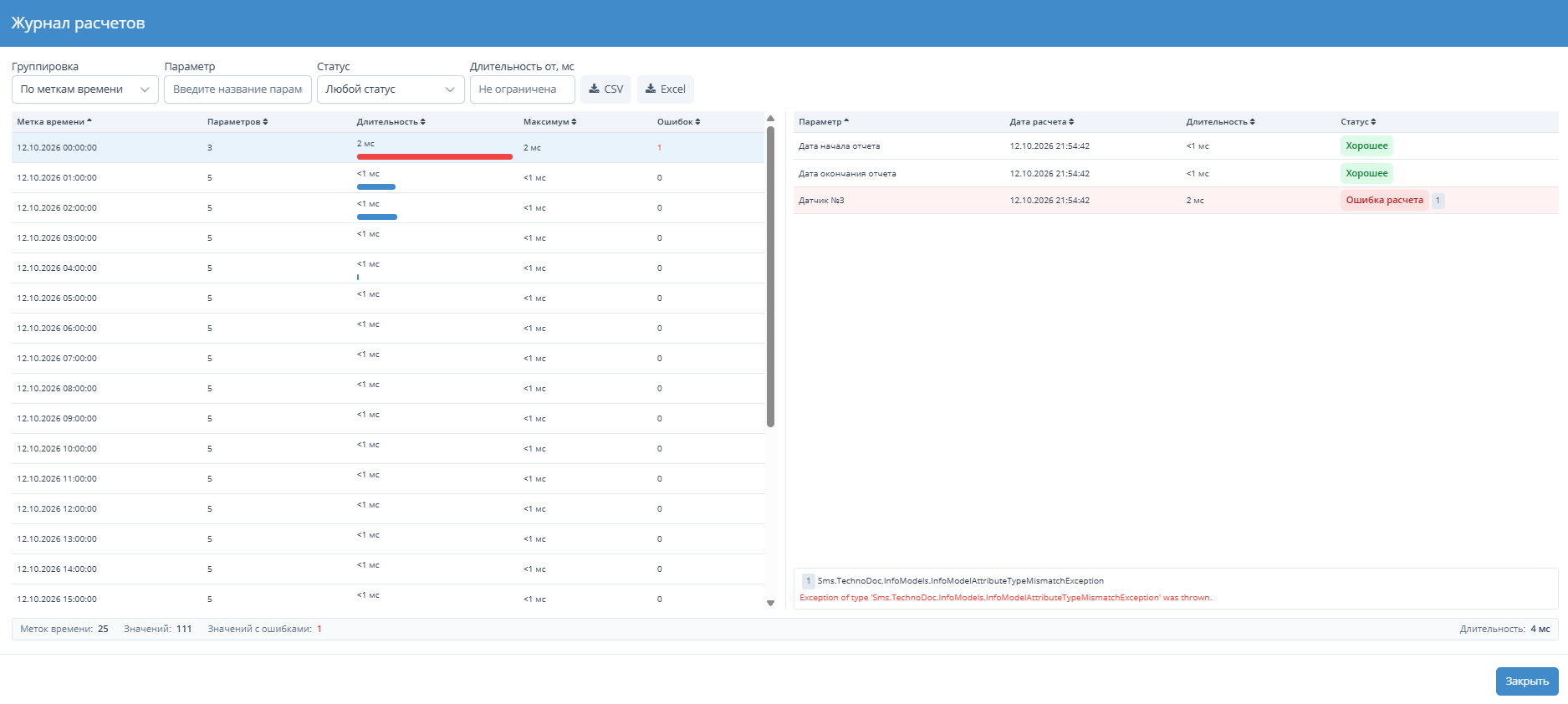
The new version introduces the calculation log, which replaces the report errors window. Now every user can not only see the list of errors, but also find the cause of slow report generation on their own, right in the TechnoDoc interface, without digging through application server logs.
Features
- Report generation metrics — calculation duration and status of each value, the number of errors and the total report calculation time.
- Breakdown by timestamp — for each timestamp, the log shows which parameters took the longest to calculate and what status the system assigned to each value.
- Calculation timeline — parameters are laid out on a chart in the order they were calculated, clearly showing how much each one contributes to the total report generation time.
- Error text — the error description, with the line number in the parameter formula, is shown in the same window.
- Export — log records can be exported to CSV and Excel.
The calculation log turns tracking down a slow report or a template error from a lengthy investigation into a few minutes in a single window: it shows which parameter and which timestamp need attention and what to fix in the formula.